How I Built a Custom GA4 & GTM Event Architecture for Lead Gen
This project transformed a B2B website from tracking basic, opaque pageviews into a highly structured, action-based conversion pipeline.
The Measurement Evolution
Before
- The website recorded aggregate pageviews, but key actions tied to lead generation were invisible.
- Form interactions and abandonment rates were entirely unmeasurable.
- High-intent actions like CTA clicks and solution-page engagement were missing from reporting.
- The business could see traffic arriving, but couldn't measure the actions most likely to drive revenue.
After
- A strategic event map successfully defined and standardized critical conversion touchpoints.
- GTM configured with pinpoint accuracy for custom form, scroll, click, and download triggers.
- GA4 DebugView fully validated the pipeline, ensuring zero duplicate events.
- Marketing teams can now pinpoint exactly which CTAs and pages drive the highest intent and inquiry volume.
The Business Problem
Many businesses install GA4 but stop at the base pageview setup.
For this lead-generation site, relying on default out-of-the-box measurement created a massive reporting gap.
Users could visit the solution page, click various CTA buttons, and start or complete forms—but none of these actions were reliably measured.
Because of this, stakeholders could not answer critical business questions like:
- Which specific CTA button drives the most engagement?
- How many visitors start the contact form but abandon it before finishing?
- Which pages support stronger commercial intent before a conversion happens?
The objective wasn't just to install a tracking pixel, but to move beyond default reporting and build a robust tracking architecture that measured the actions most closely tied to lead generation.
My Approach: Engineering a Custom Measurement Architecture
To ensure the client had a granular, highly actionable dataset, I bypassed default enhanced measurement and engineered a fully customized event pipeline using Google Tag Manager.
Here is the technical breakdown of how I executed the tracking architecture:
1. Discovery & Event Taxonomy Design
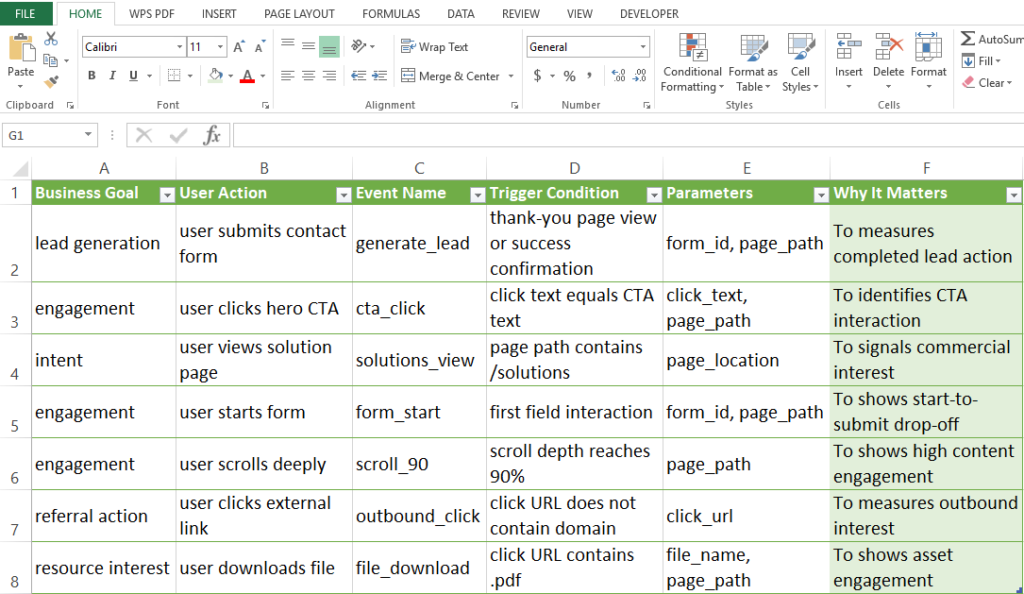
Before opening GTM, I audited the website’s DOM structure and mapped specific business KPIs (Lead Gen, Engagement, Intent) to trackable user interactions.
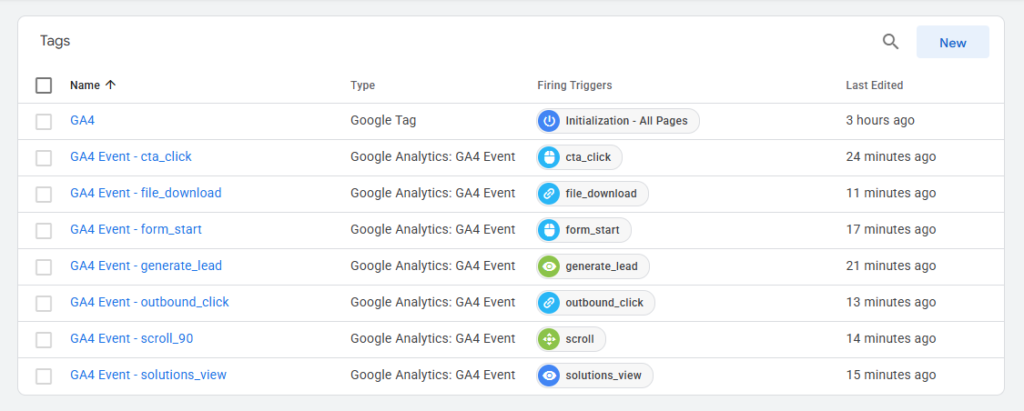
I developed a strict, standardized event taxonomy using snake_case naming conventions (e.g., generate_lead, form_start).
This ensured the raw data would be clean, predictable, and immediately ready for modeling in downstream visualization tools like Looker Studio or Power BI without requiring heavy transformations.
2. Precision Trigger Engineering in GTM
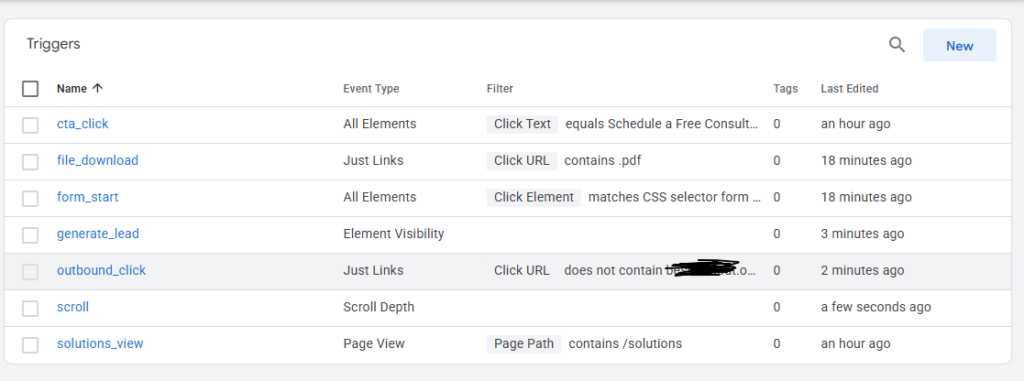
I enabled built-in GTM variables (Click Classes, Form IDs, Page Path) and configured highly specific triggers to capture user intent without misfires:
CSS Selectors & Click Variables:
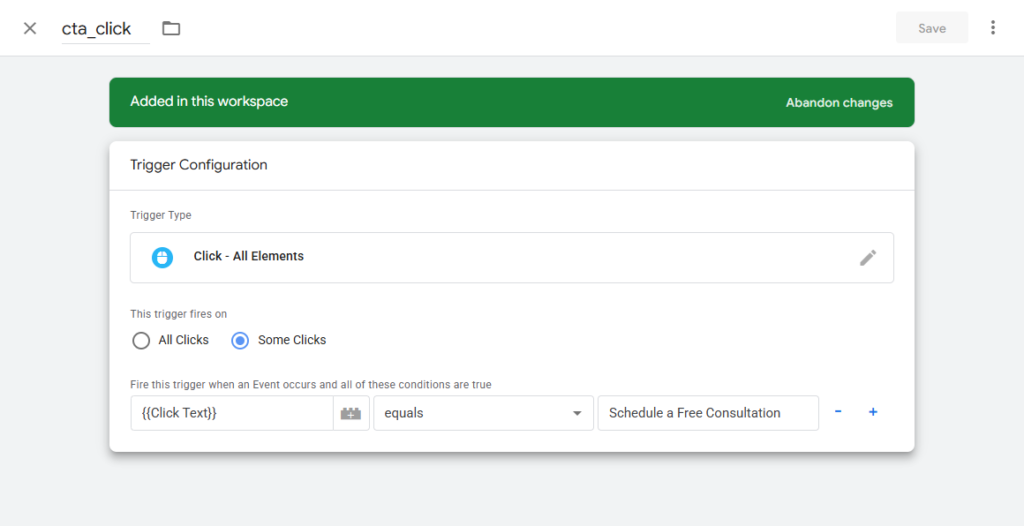
For the Hero CTA (cta_click), I utilized specific CSS class selectors and Click Text variables to isolate the exact button, preventing false positives from generic site clicks.
Path Rules for Intent:
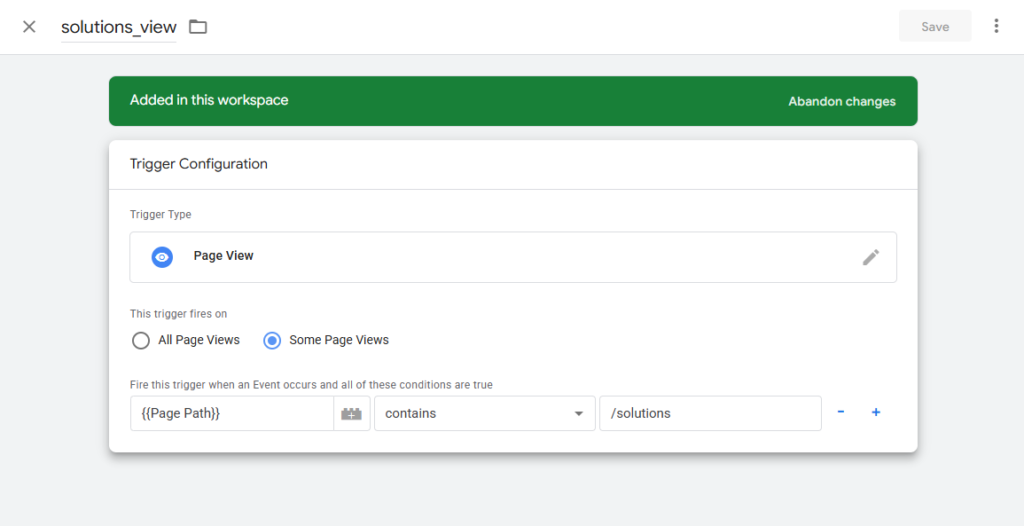
I applied path matching to accurately fire the solutions_view event whenever a user navigated to the core services page, isolating high-intent commercial traffic.
Funnel Drop-off Tracking:
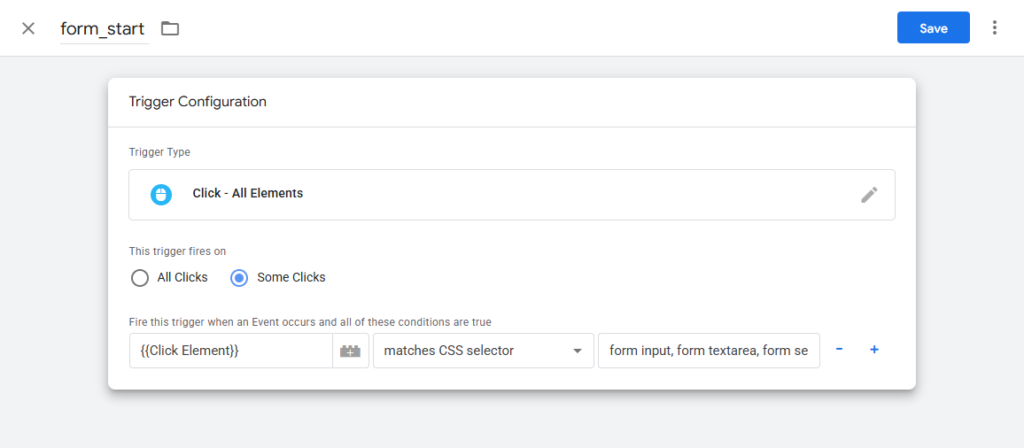
To measure form abandonment, I implemented a form_start event triggered by the very first field interaction.
I then paired this with a generate_lead trigger that fired only when the confirmation state was successful, enabling precise drop-off calculations.
Engagement Listeners:
I deployed scroll depth triggers (scroll_90) to measure reading behavior, outbound link clicks (outbound_click) to track partner referrals, and file download listeners (file_download targeting .pdf extensions) to prove content marketing ROI.
3. Data Enrichment via Custom Parameters
An event count alone lacks context. So, I enriched every custom event by passing dynamic Event Parameters into GA4.
For example, when a user triggered form_start, the GTM tag dynamically pulled the form_id and page_path and passed them as parameters.
This allows the business to pivot the data and identify exactly which form on which landing page causes the highest friction.
Finally, I registered all custom parameters as Custom Dimensions within the GA4 property settings, ensuring the data was unblocked for executive dashboards.
The Event Architecture Deliverable
This standardized tracking framework now dictates the data flow from the website into GA4, powering the entire reporting capability:
| Business Goal | User Action | GA4 Event Name | Trigger Condition | Custom Parameters |
|---|---|---|---|---|
| Lead Gen | Submits contact form | generate_lead |
Thank-you page view/success state | form_id, page_path |
| Engagement | Clicks Hero CTA | cta_click |
Click text equals CTA text | click_text, page_path |
| Intent | Views solution page | solutions_view |
Page path contains /solutions |
page_location |
| Engagement | Starts filling form | form_start |
First input field interaction | form_id, page_path |
| Engagement | Scrolls deeply | scroll_90 |
Scroll depth reaches 90% | page_path |
| Referral | Clicks external link | outbound_click |
URL does not contain root domain | click_url |
| Resource | Downloads a file | file_download |
Click URL contains .pdf |
file_name, page_path |
Validation & Quality Assurance
Implementation is only half the job; validation is what makes the data trustworthy.
I ran the entire container through a rigorous QA protocol.
Using GTM Preview Mode, I confirmed that the CTA click event fired exactly once per click, solutions events triggered only on the correct URL, and outbound clicks successfully excluded internal links.
I then generated controlled test interactions across the site and utilized GA4 DebugView to verify the payload reached the analytics servers with all custom parameters intact.
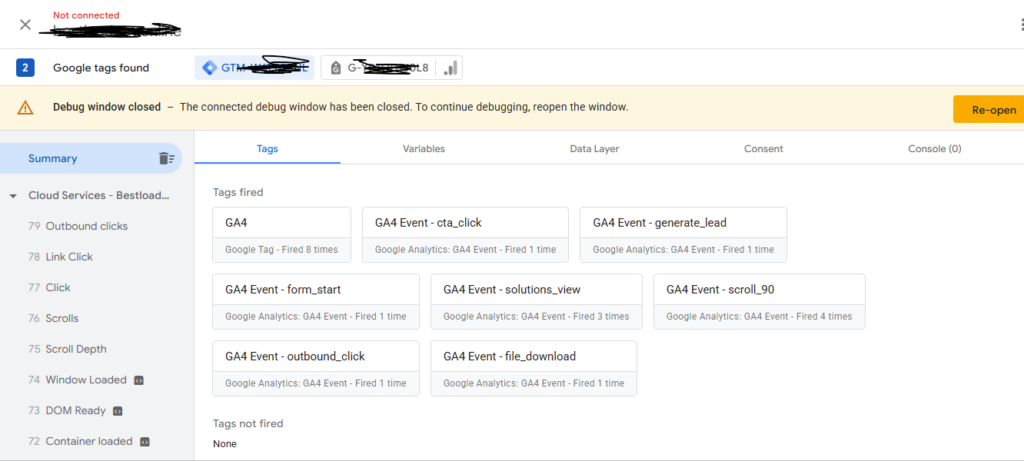
This ensured zero data loss and prevented noisy, duplicated events from polluting the dataset.
What a Business Owner Gains
By moving from basic traffic reporting to action-based conversion tracking, a business owner gains:
Quantifiable ROI
Click to RevealAn end to "black box" marketing; every critical user action is now quantifiable.
Funnel Visibility
Click to RevealClear visibility into where potential leads are abandoning the funnel before converting.
True Attribution
Click to RevealThe ability to directly compare CTA interaction versus actual form completion.
Scalable Data
Click to RevealA clean, standardized foundation for future Looker Studio reporting and budget allocation.
Note on Methodology: To prove the underlying data architecture, this case study utilizes a controlled, synthetic testing environment. By generating targeted, high-intent user sessions, I am able to definitively prove the GTM triggers, GA4 parameter mapping, and DebugView validation pipelines work flawlessly, preparing the architecture to handle live, scaled enterprise traffic without data loss.