Resolving a $7M Pipeline Discrepancy: Reconciling GA4 & Salesforce
How I built a deterministic SQL Identity Graph to connect raw GA4 event logs directly to Salesforce CRM data. This project resolved a severe Q3 reporting discrepancy between Marketing and Sales, recovering 1,600 missing leads and eliminating $7M in ghost pipeline revenue.
During the Q3 executive pipeline review, a severe data discrepancy emerged: Marketing reported highly efficient Cost Per Lead (CPL) metrics, while Sales reported degraded lead volume and missing revenue. To bridge this gap, I bypassed standard BI connectors and built a custom ELT pipeline joining raw GA4 BigQuery exports with Salesforce CRM data. By identifying a Google Tag Manager double-fire error and engineering a deterministic SQL Identity Graph to heal disconnected records, I successfully aligned the datasets. This project recovered 1,600 missing leads, eliminated $7M in false pipeline revenue, and provided leadership with a verified financial baseline for their quarterly ad budgets.
The Q3 Strategic Misalignment
In B2B SaaS, data silos between marketing automation and CRM systems are the main reason why CAC and ROAS numbers can be inaccurate.
Our executive team ran into this issue one Monday morning. The VP of Marketing presented a slide showing 7,285 leads from LinkedIn and Google Ads. The VP of Sales countered with a Salesforce dashboard showing a heavily degraded lead volume and missing closed-won revenue. Sales blamed Marketing for focusing on clicks that did not convert, while Marketing said Sales was not following up on leads.
Leadership quickly paused $150,000 in monthly ad spending. The CMO asked for the raw data to connect ad spend to real closed-won revenue and to find the source of the problem.
The usual default data connectors did not work, so I had to use the raw data directly: a BigQuery export of GA4 events and a CSV file of Salesforce leads.
Here’s how I solved it.
Initial Data Exploration: Identifying the Cartesian Explosion
Ideally, merging a web analytics table with a CRM database is straightforward: you use a LEFT JOIN on a shared primary key, such as lead_id.
To set a baseline, I wrote a simple query joining CRM pipeline data to GA4 generate_lead events. The results quickly showed a severe architectural problem.
The $53M Cartesian Explosion
The naive SQL join resulted in multiple GA4 matches per CRM lead, duplicating revenue values and creating a massive artificial spike in reported ARR compared to the true baseline.
View SQL Query: The Naive Join
SELECT
    crm.lead_id, crm.email, crm.pipeline_stage, crm.arr_revenue,
    ga4.event_timestamp, ga4.source_medium
FROM salesforce_leads crm
LEFT JOIN ga4_raw_export ga4
    ON crm.lead_id = ga4.custom_lead_id
    AND ga4.event_name = 'generate_lead';
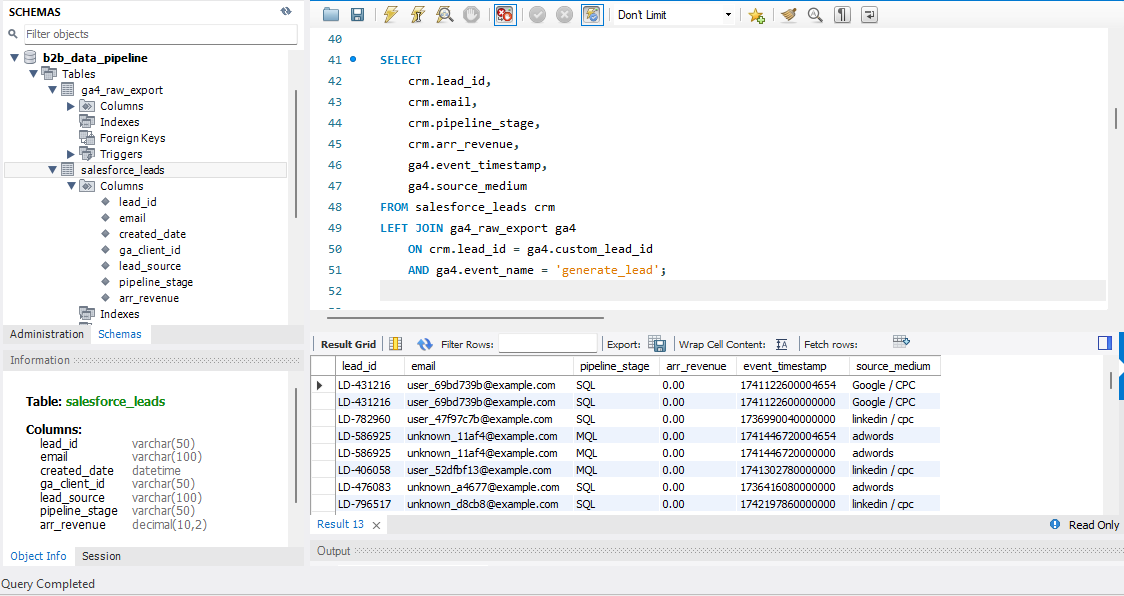
Instead of the 7,285 leads strictly in the CRM, the joined data showed over 8,450 rows. Even worse, the total pipeline ARR jumped to more than $53 million, which was clearly not accurate.
This is a common data modeling problem called a Cartesian explosion (or fan-out). When a database finds multiple matches on the right side of a JOIN, it duplicates the left-side row for each match. For example, if a $50,000 deal matches twice in GA4, the dashboard will show $100,000.
If I had trusted this raw join and sent it to Power BI, leadership might have made serious forecasting mistakes. I needed to find and fix the duplication at its source.
Root Cause Analysis: Resolving Duplicate Tracking Events
I singled out the GA4 leads that were duplicated and looked at the raw BigQuery schema. By checking the event_timestamp and user_pseudo_id, I saw a clear pattern.
I found that the same user was triggering the generate_lead event twice, sometimes just seconds or minutes apart. The Google Tag Manager (GTM) tag was firing twice. For example, if someone submitted a demo request, left the page, and then came back or refreshed the "Thank You" page, GTM sent a duplicate conversion to GA4.
To fix this in SQL, I could not just use GROUP BY because that would remove important row-level UTM and campaign details needed for the final attribution model.
Instead, I built a Common Table Expression (CTE) using the ROW_NUMBER() window function. By grouping data by custom_lead_id and sorting events by time, I could identify the real first touchpoint and filter out duplicates.
View SQL Query: Deduplication CTE
WITH Deduplicated_GA4 AS (
    SELECT
        custom_lead_id, event_timestamp, source_medium, campaign,
        ROW_NUMBER() OVER (PARTITION BY custom_lead_id ORDER BY event_timestamp ASC) as rn
    FROM ga4_raw_export
    WHERE event_name = 'generate_lead'
      AND custom_lead_id IS NOT NULL
)
SELECT
    COUNT(crm.lead_id) as total_leads,
    SUM(crm.arr_revenue) as true_arr
FROM salesforce_leads crm
LEFT JOIN Deduplicated_GA4 ga4
    ON crm.lead_id = ga4.custom_lead_id
    AND ga4.rn = 1;
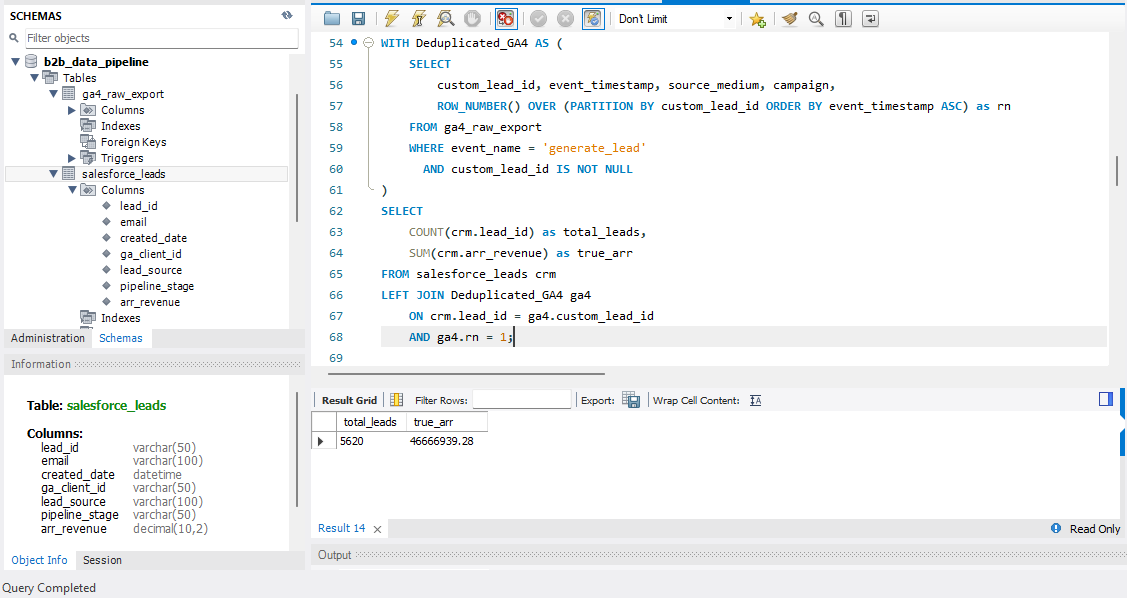
This fixed the fan-out problem. The ARR numbers went back to normal, successfully eliminating about $7M in false pipeline revenue.
To fix the root cause, I worked with the front-end team to make a lasting change. We added a unique transaction_id to the dataLayer when a form was first submitted and set up GTM to use a session storage flag. I also added an Exception Trigger in GTM so the conversion tag would only fire once per session, protecting data quality in the future.
Analyzing the Disconnected CRM Data Records
After removing the duplicate leads, the matched lead count dropped to 5,685. Then I faced a new problem: exactly 1,600 qualified leads were in Salesforce but had no link to GA4.
I filtered the CRM data to look at these unmatched leads. The data revealed a bigger issue with how leads were handled:
- The primary key (
lead_id) was NULL. - The secondary tracking key (
ga_client_id) was NULL. - The
lead_sourcewas overwhelmingly categorized as "Manual Entry" or "Cold Call."
I found that Sales Account Executives were getting calls or emails from prospects and entering their details directly into Salesforce. Because they skipped the website lead form, the tracking data was lost.
Most analysts might label these 1,600 leads as only "Sales Generated / Offline," telling the VP of Marketing that her campaigns had no impact. But in B2B, buyers almost always interact online before calling Sales. They probably clicked ads or read blog posts weeks earlier. The tracking data was not missing; it was just disconnected.
Cross-Departmental Diffusion
I presented this proof of 1,600 disconnected leads to the VP of Sales and the CMO so they could work together to resolve the problem rather than assigning blame. Sales was not ignoring leads, and Marketing was not responsible for fake clicks. The core issue was a broken process.
Engineering the Deterministic Identity Graph
To reconnect these unmatched leads and rebuild the real buyer journey, I built a deterministic Identity Graph in SQL.
An Identity Graph uses fallback logic to connect user sessions across platforms. If the main key is missing, it tries to match using a secondary key, such as the prospect’s email address.
Step 1: Building the Bridging Table
I queried the entire CRM history to build a master bridging table. This CTE searched for cases where both a user’s email and their GA4 cookie (ga_client_id) were captured in past events, such as whitepaper downloads or webinar signups.
Step 2: Healing the Broken Records via COALESCE
Next, I ran the current Q3 pipeline through this graph using the COALESCE() function. When SQL found a manual entry with a missing tracking ID, COALESCE checked the Identity Graph. If the email was in our history, it pulled the old ga_client_id and linked it to the new record.
View SQL Query: Identity Graph & COALESCE
WITH Identity_Graph AS (
    SELECT
        email,
        MAX(ga_client_id) as master_ga_id
    FROM salesforce_leads
    WHERE ga_client_id IS NOT NULL
    GROUP BY email
),
Healed_CRM AS (
    SELECT
        crm.email,
        crm.pipeline_stage,
        crm.arr_revenue,
        COALESCE(crm.ga_client_id, ig.master_ga_id) as final_ga_client_id
    FROM salesforce_leads crm
    LEFT JOIN Identity_Graph ig ON crm.email = ig.email
),
Deduplicated_GA4 AS (
    SELECT
        user_pseudo_id,
        source_medium,
        campaign,
        ROW_NUMBER() OVER (PARTITION BY user_pseudo_id ORDER BY event_timestamp ASC) as rn
    FROM ga4_raw_export
    WHERE event_name = 'generate_lead'
)
SELECT
    ga4.source_medium,
    COUNT(crm.email) as total_leads,
    SUM(crm.arr_revenue) as true_arr
FROM Healed_CRM crm
LEFT JOIN Deduplicated_GA4 ga4
    ON crm.final_ga_client_id = ga4.user_pseudo_id AND ga4.rn = 1
GROUP BY ga4.source_medium
ORDER BY true_arr DESC;
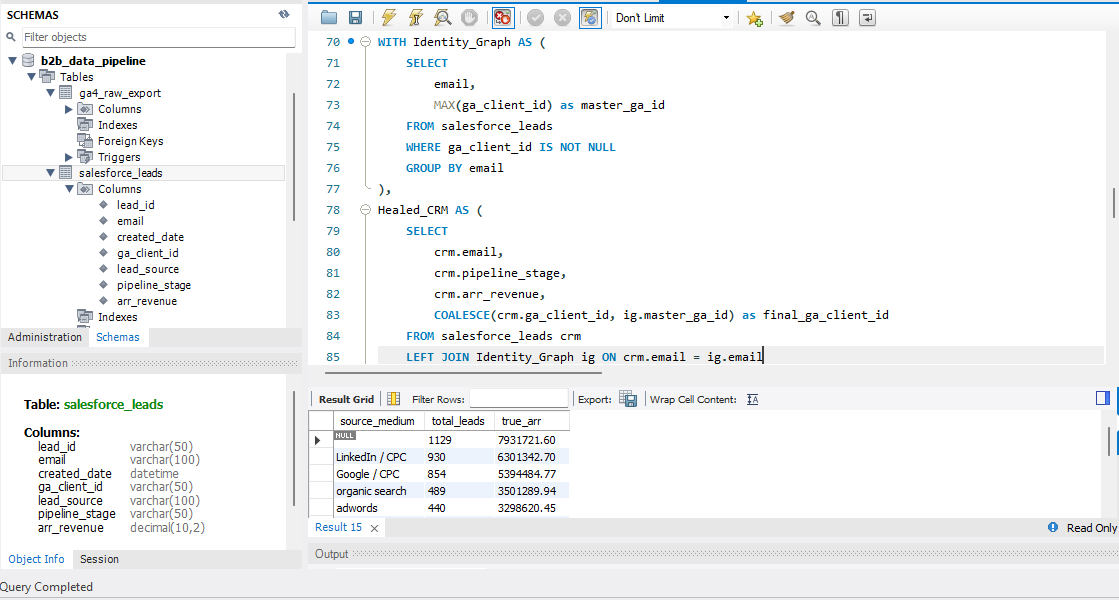
Fig 2: Using COALESCE to resolve identities and heal disconnected CRM records.
Model Limitations
This solution reconnected 84% (1,344) of the 1,600 disconnected records to their original digital marketing campaigns.
However, a deterministic COALESCE match is rarely perfect and can fail in specific cases. For example, if a user downloads a whitepaper with a personal Gmail address but later uses a work email during a sales call, the match may not succeed. It also fails if strong ad blockers prevent initial cookie tracking.
We grouped the remaining 16% (256 leads) that did not match as 'Offline / Unattributed', adding them to our existing baseline of naturally offline sales. To improve this in the future, I recommended developing a probabilistic matching model that will use IP addresses, company size, and timestamp proximity to help identify these leads.
Data Normalization
With the mapping in place, the data was accurate but not ready for executives. As seen in the raw SQL output above, the source_medium strings were messy because different media agencies used inconsistent UTM tracking (like LinkedIn / CPC, linkedin ads, LI / cpc).
To make the final dashboard clear for executives, I added a normalization step to the master join. Using LOWER(), TRIM(), and CASE statements, I cleaned up the chaotic source strings into standard channel groups.
View SQL Query: Final Master Join
WITH Identity_Graph AS (
    SELECT
        email,
        MAX(ga_client_id) as master_ga_id
    FROM salesforce_leads
    WHERE ga_client_id IS NOT NULL
    GROUP BY email
),
Healed_CRM AS (
    SELECT
        crm.email,
        crm.pipeline_stage,
        crm.arr_revenue,
        COALESCE(crm.ga_client_id, ig.master_ga_id) as final_ga_client_id
    FROM salesforce_leads crm
    LEFT JOIN Identity_Graph ig ON crm.email = ig.email
),
Deduplicated_GA4 AS (
    SELECT
        user_pseudo_id,
        source_medium,
        campaign,
        ROW_NUMBER() OVER (PARTITION BY user_pseudo_id ORDER BY event_timestamp ASC) as rn
    FROM ga4_raw_export
    WHERE event_name = 'generate_lead'
)
SELECT
    CASE
        WHEN LOWER(TRIM(ga4.source_medium)) IN ('linkedin / cpc', 'li / cpc', 'linkedin ads') THEN 'Paid Social (LinkedIn)'
        WHEN LOWER(TRIM(ga4.source_medium)) IN ('google / cpc', 'google / ads', 'adwords') THEN 'Paid Search (Google)'
        WHEN LOWER(TRIM(ga4.source_medium)) IN ('google / organic', 'organic search', 'seo') THEN 'Organic Search'
        WHEN LOWER(TRIM(ga4.source_medium)) IN ('direct / none', '(direct) / (none)') THEN 'Direct'
        ELSE 'Offline / Unattributed'
    END as channel_group,
    COUNT(crm.email) as total_leads,
    SUM(crm.arr_revenue) as true_arr
FROM Healed_CRM crm
LEFT JOIN Deduplicated_GA4 ga4
    ON crm.final_ga_client_id = ga4.user_pseudo_id
    AND ga4.rn = 1
GROUP BY channel_group
ORDER BY true_arr DESC;
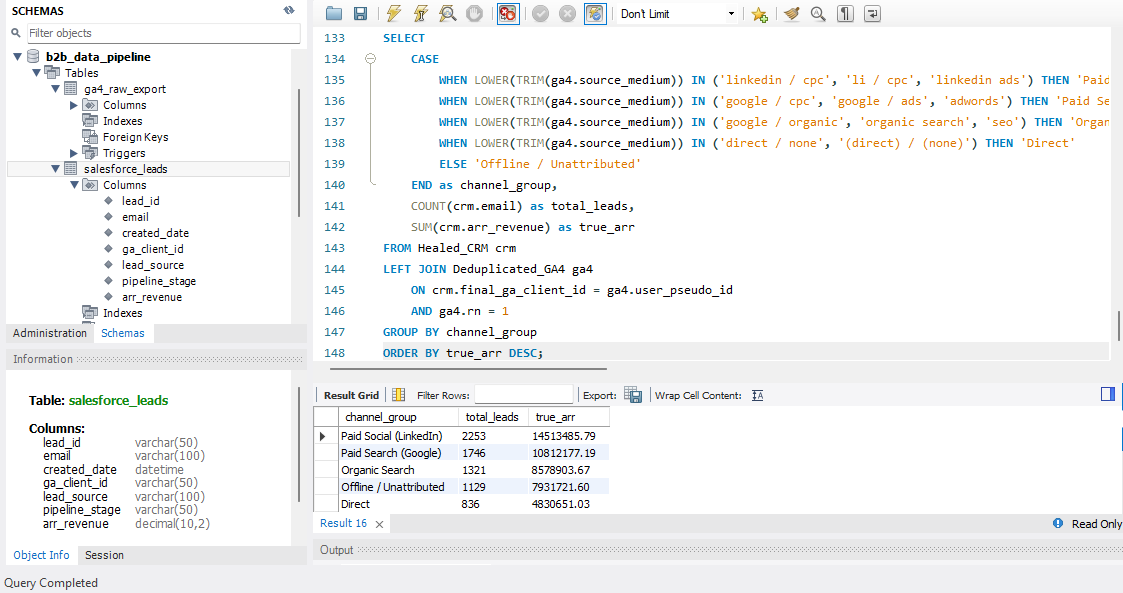
Executive Dashboard Summary
Q3 Pipeline Attribution
Post-Identity Graph Resolution (Deduplicated & Healed)
Revenue by Standardized Channel
| Channel Group | Total Leads | True ARR |
|---|---|---|
| Paid Social (LinkedIn) | 2,253 | $14,513,485 |
| Paid Search (Google) | 1,746 | $10,812,177 |
| Organic Search | 1,321 | $8,578,903 |
| Offline / Unattributed | 1,129 | $7,931,721 |
| Direct | 836 | $4,830,651 |
Strategic Impact & Governance
When I showed the raw data output to the CMO and VP of Sales, the misalignment was instantly resolved. The data proved Marketing was generating high-value pipeline, but broken tracking and manual Sales processes were hiding it. By building this unified data pipeline, I achieved three key business results:
- Restored Data Trust: Prevented multi-million dollar forecasting errors by eliminating the ghost pipeline revenue traced back to the GTM double-fire.
- Revealed True ROAS: Recovered over 1,300 manually entered leads, showing that Paid Social and Organic Search were driving top-of-funnel awareness for high-value accounts that Sales had thought were only offline acquisitions.
- Enabled Strategic Reallocation: Leadership confidently restarted the $150k/month ad budget. With accurate CAC and pipeline metrics, we shifted 30% of the budget from underperforming channels to our best LinkedIn campaigns.
Note: The true value of data analytics lies in driving behavioral change. To prevent recurrence, I partnered with RevOps to implement a governance loop. We set up strict Salesforce validation rules so that AEs cannot save a new lead without choosing a verified Lead Source and entering a required Campaign_ID. This change at the point of data entry ensures long-term accuracy of the attribution pipeline.