Building a First-Party Tracking Pipeline Using Cloudflare GTG and sGTM
How I bypassed standard ITP restrictions by shifting from client-side JavaScript tracking to a resilient, server-side HTTP pipeline.
Set-Cookie HTTP HeadersAs a Marketing Data Analyst, one of the most frustrating challenges you face today is the aggressive degradation of data quality caused by browser tracking prevention. In my previous case study—where I reverse-engineered how ad blockers were skewing conversion data by over 36%—I concluded that modern attribution must evolve toward server-side architectures to survive.
While ad blockers create massive visibility gaps, they are only half the problem. Even a user who never installs an ad blocker still gets their data scrubbed by the browser itself.
The Safari ITP Death Sentence
Let’s say you run a campaign. A user clicks your ad, browses your site, leaves, and comes back 10 days later to convert. Normally, that conversion is attributed to your campaign. But on Safari, it isn't.
Apple's Intelligent Tracking Prevention (ITP) forces a strict 7-day expiration limit on cookies created via JavaScript (document.cookie). Worse, if the user lands on your site with a tracking parameter in the URL (like a gclid from Google Ads or an fbclid from Meta), Safari caps that cookie's lifespan to just 24 hours. Your multi-touch attribution breaks instantly.
The returning user gets logged as a brand-new visitor, and the campaign that actually drove the conversion gets zero credit.
The best solution is to move away from client-side JavaScript tracking entirely and build a first-party tracking pipeline. By using Server-Side Google Tag Manager (sGTM) paired with a Cloudflare reverse proxy, you can set your tracking cookies via secure HTTP response headers directly from your own domain instead of the browser. ITP respects HTTP-only first-party cookies, allowing you to extend their lifespan back to two years.
This guide breaks down exactly how I architected this pipeline, using the sandbox domain bestloadout.online as the testing ground.
The Architecture Overview
Before provisioning any servers, it's critical to map how the data will flow.
Client-Side (Default)
- User visits
bestloadout.online. - Browser downloads GTM script from
www.googletagmanager.com. - Script executes in browser, sending events directly to
www.google-analytics.com. - Result: Safari flags the third-party script and restricts the cookie lifespan to 1-7 days.
First-Party Server-Side
- User visits
bestloadout.online. - Cloudflare intercepts and serves the GTM script natively from
bestloadout.online/gtm.js. - Events route to custom endpoint:
metrics.bestloadout.online. - Result: Server sends back a
Set-Cookieheader. Safari views it as secure first-party data.

Step 1: Provisioning the Tagging Server Environments
To process data server-side, you need a server environment. There are two primary ways to approach this.
Method 1: Google Cloud Run
The enterprise standard. Requires setting up two distinct Cloud Run services (Preview and Tagging) allowing it to auto-scale.
Requires a verified GCP billing account. If local banking cards fail international verification, provisioning is blocked.
Method 2: Stape.io (Used Here)
Provides a free dev tier allowing 10,000 requests/month with absolutely no credit card required. Perfect sandbox environment.
Deploy via container config string, map a custom subdomain, and manage DNS via Cloudflare.
- Ensure your DNS nameservers are already pointing to Cloudflare.
- Create a subdomain for the server side:
metrics.bestloadout.online. - Open GTM, create a Server container, and copy the Container Config string.
- Create a Stape.io account, deploy a new container using the string, and add your custom subdomain in Stape settings.
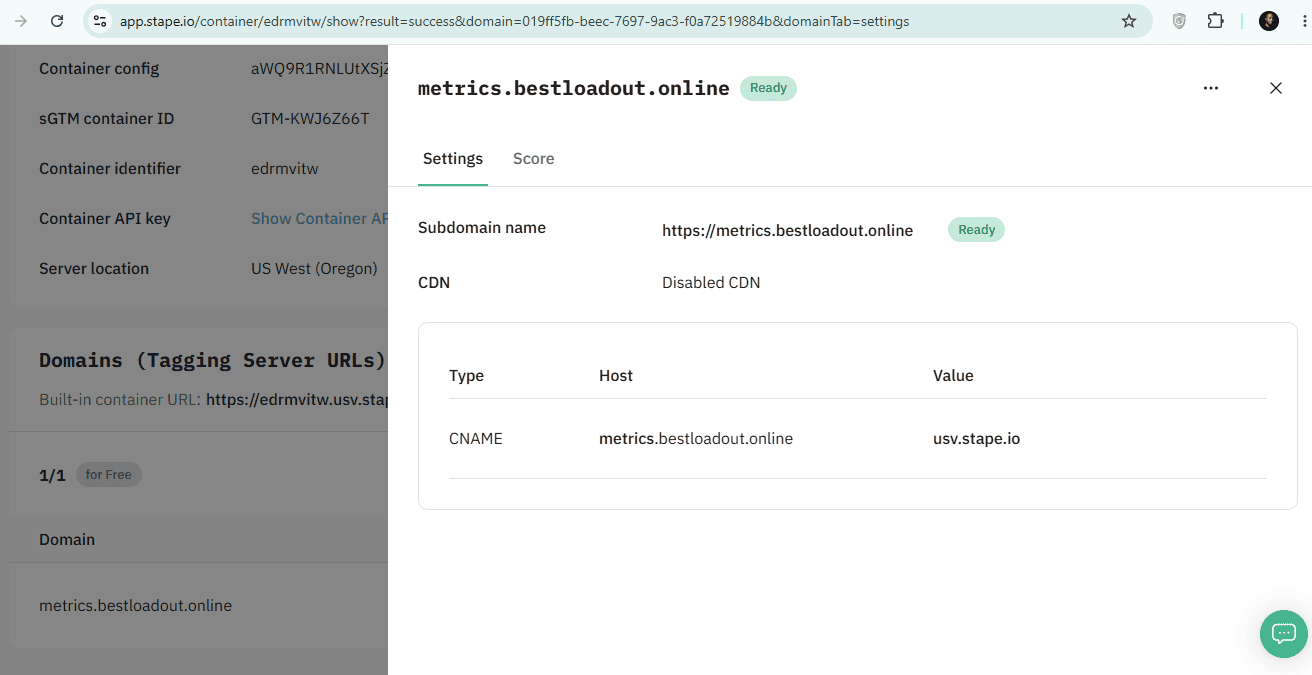
On Cloudflare, create a CNAME record pointing metrics to the target provided by Stape. Crucial: Set the Cloudflare proxy status for this record to DNS Only (grey cloud) and leave it there permanently. Stape must be able to continuously ping the domain to auto-renew your SSL certificate. If you turn on the Cloudflare proxy (orange cloud), Stape's verification handshake will fail, and your tracking will eventually disconnect.
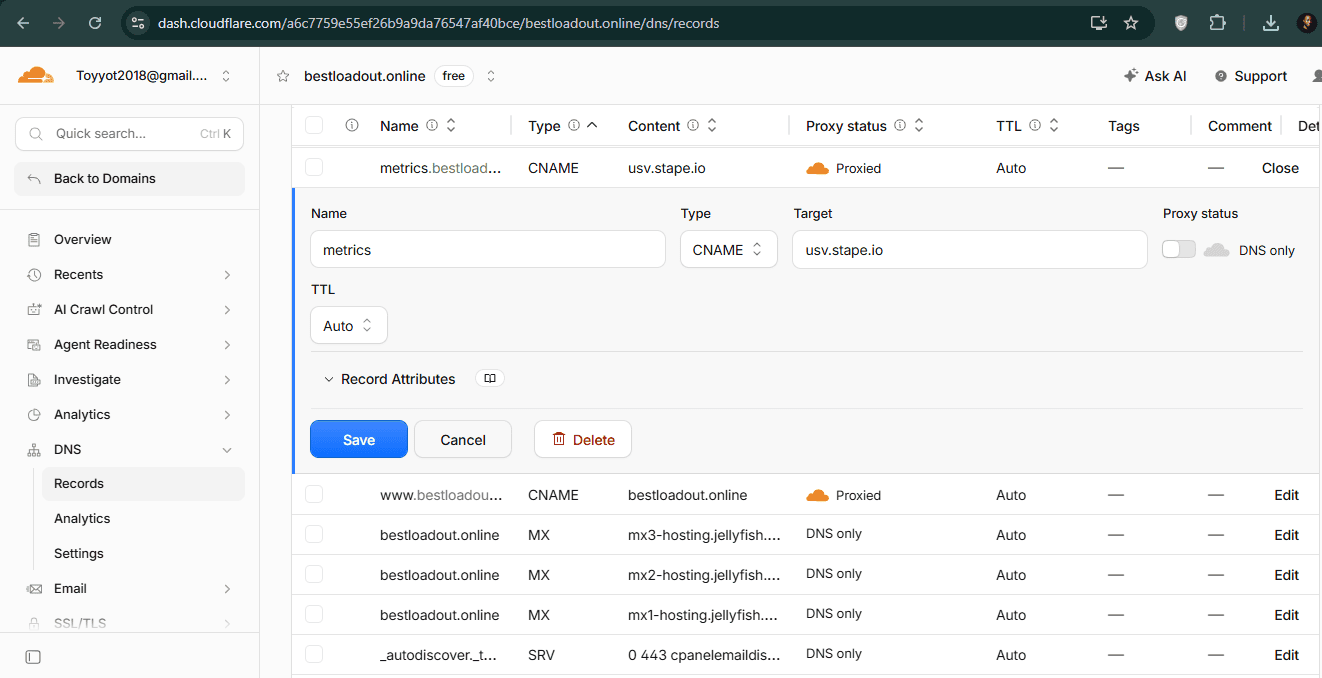
Once verified, update the Tagging Server URL in your GTM Server Container Admin settings to https://metrics.bestloadout.online.
Note: Stape provisions and manages a free SSL certificate (via Let's Encrypt) for your custom domain so that your server can securely accept HTTPS requests. Leaving the proxy off prevents Cloudflare from intercepting this validation.
Step 2: Configuring the Cloudflare Google Tag Gateway
The server is ready, but the actual GTM library (gtm.js) is still loading from Google's servers, leaving it vulnerable to network-level ad blockers. Cloudflare's Google Tag Gateway (GTG) solves this as a reverse proxy.
- In the Cloudflare dashboard, search for Google Tag Gateway.
- Enable the feature for your domain.
- Turn off the "Set up tag" automated injection toggle.
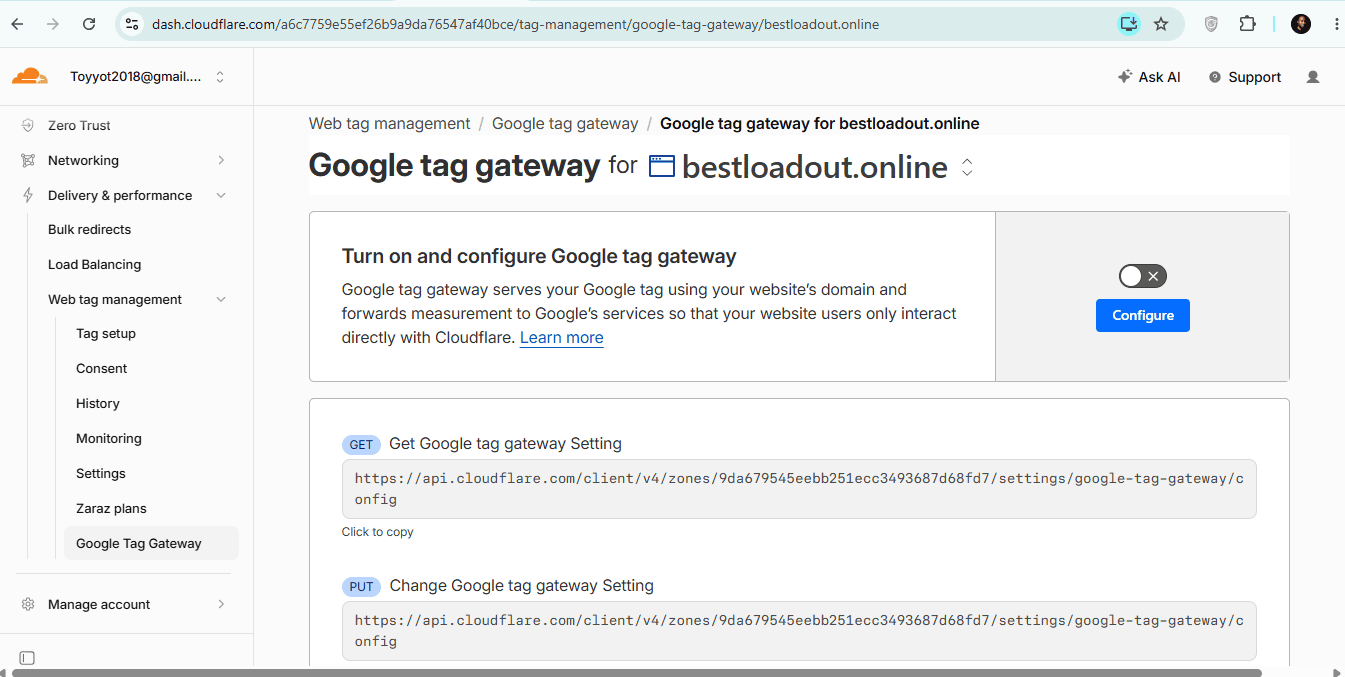
Automated injection causes duplicate container loads and fires tags unpredictably. A data analyst needs strict architectural control over their tag placements, so leaving this off is the best practice.
Step 3: Modifying the Client-Side Code
Because the auto-injector is off, the hardcoded GTM snippets on the website need to be updated manually to point to the new first-party gateway.
<!-- Google Tag Manager -->
<script>(function(w,d,s,l,i){w[l]=w[l]||[];w[l].push({'gtm.start':
new Date().getTime(),event:'gtm.js'});var f=d.getElementsByTagName(s)[0],
j=d.createElement(s),dl=l!='dataLayer'?'&l='+l:'';j.async=true;
j.src='https://metrics.bestloadout.online/gtm.js?id='+i+dl;
f.parentNode.insertBefore(j,f);
})(window,document,'script','dataLayer','GTM-XXXXXXX');</script>
<!-- End Google Tag Manager -->
Locate the standard googletagmanager.com/gtm.js URL inside the script and replace it with your custom domain as shown above.
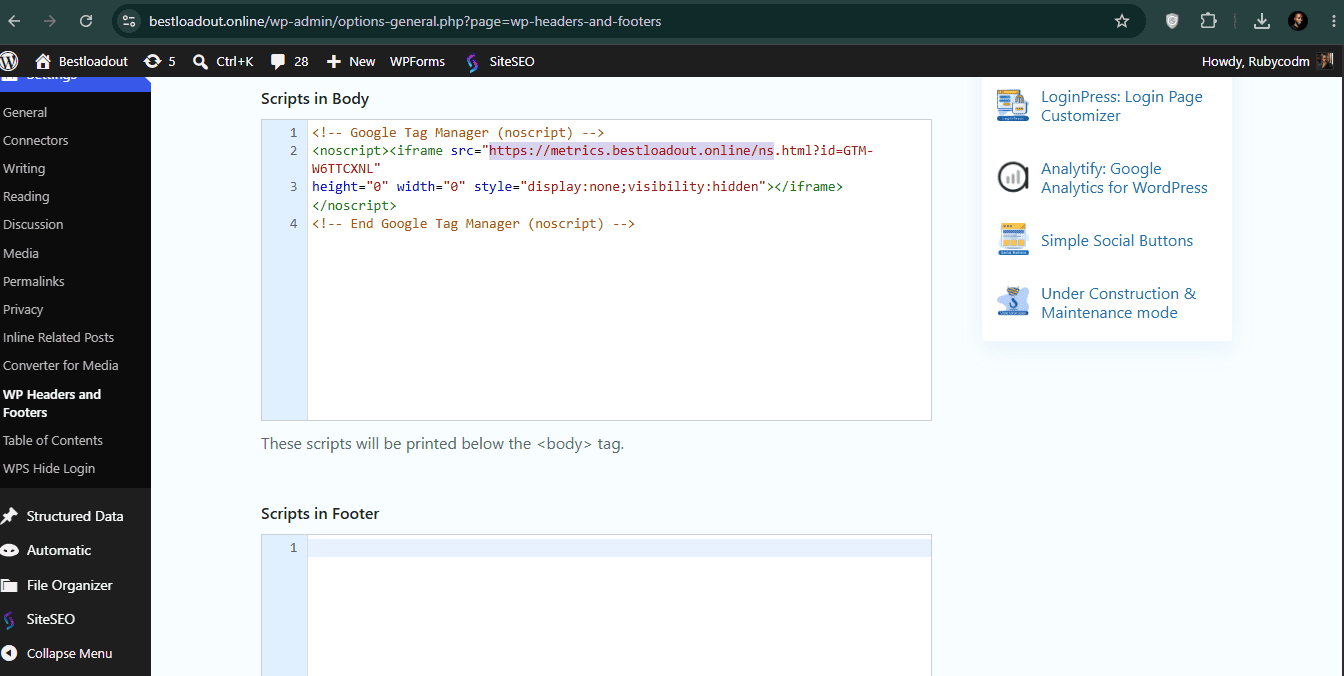
Optional but recommended: To avoid detection by privacy scanners parsing raw HTML, update the fallback pixel domain in the <noscript> tag too. Change it to metrics.bestloadout.online/ns.html.
Step 4: Routing the Web Container Data
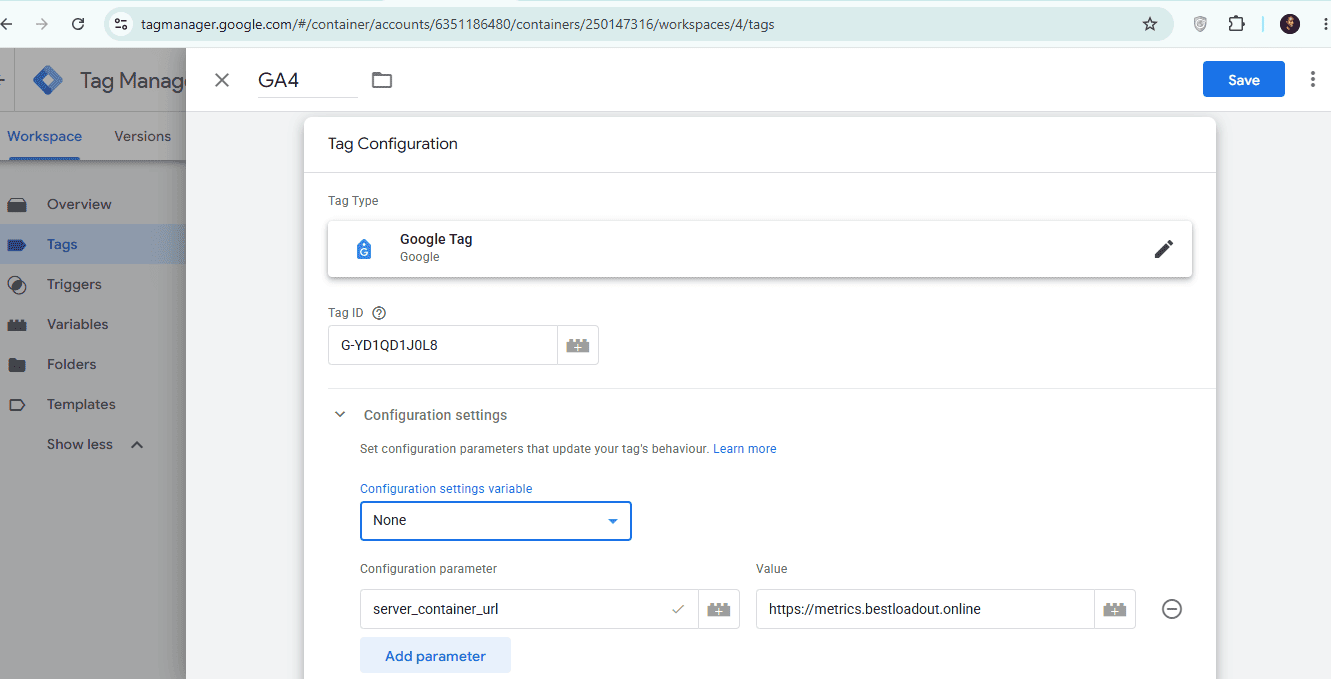
With the script loading first-party, the GA4 tags need to be told to send their payloads (/g/collect requests) to the new server instead of Google's default endpoints.
- Open your Web GTM Container.
- Open your base Google Tag.
- Under Configuration Settings, add a new parameter named
server_container_url. - Set the value to
https://metrics.bestloadout.online.
Step 5: Setting the Cookie — The Conversion Linker
To bypass ITP's client-side caps, the server has to explicitly write the cookie back to the browser using an HTTP header.
- Open your Server GTM Container.
- Ensure the GA4 Client is active to catch incoming requests.
- Create a new tag and select Conversion Linker.
- Set the trigger to fire on All Pages. Save and publish.
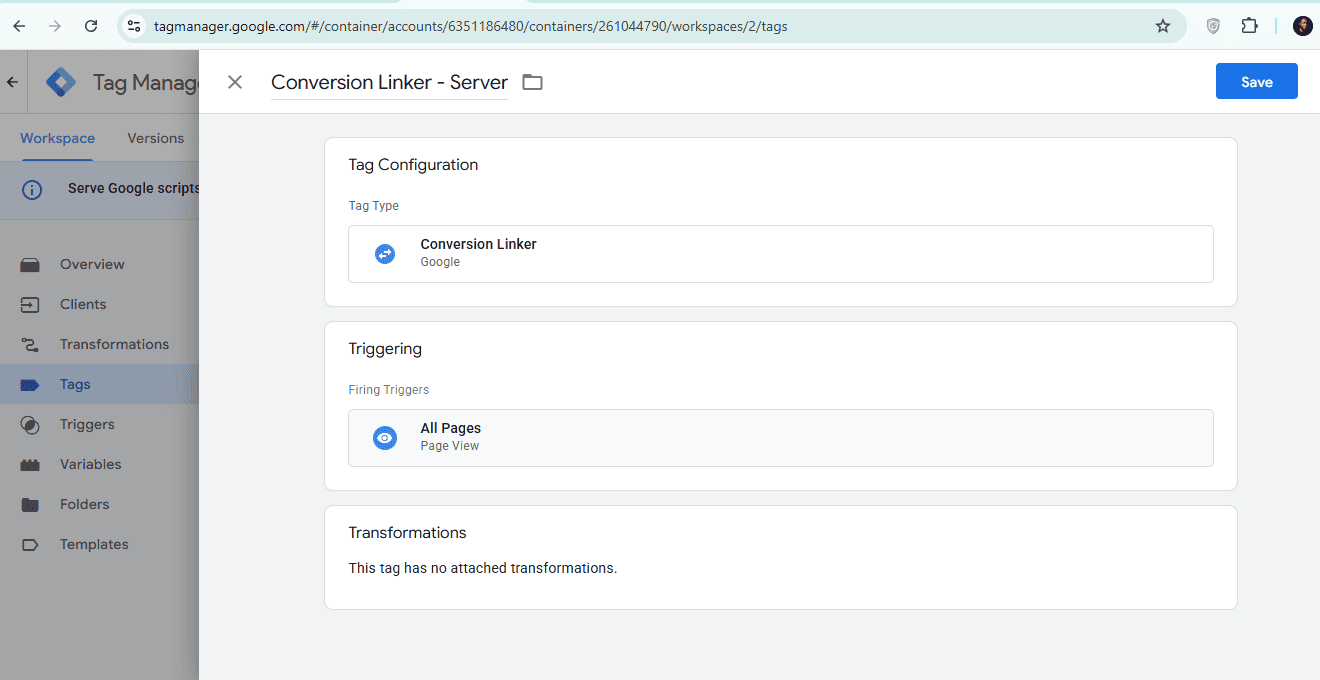
What happens: The server responds to the browser with a 200 OK status, attaching a Set-Cookie header. Because this originates from a genuine first-party interaction, the cookie isn't subject to ITP's JavaScript-cookie restrictions.

Step 6: Testing, Troubleshooting, and Live Validation
Common Bottlenecks & Troubleshooting
If requests are still firing to google-analytics.com, check these 4 bottlenecks:
1. Browser Caching
Browsers hold onto the old gtm.js. Force an Empty Cache and Hard Reload in DevTools.
2. Unpublished Workspace
You must actively submit and publish the Web GTM container to push the routing rule to production.
3. Cloudflare Edge Cache
The CDN holds onto the outdated script. Navigate to Cloudflare's Caching configuration and Purge Everything.
4. Rogue Plugins
Plugins like Google Site Kit force hardcoded client-side hits. Disable them.
Validating the Success State
1. The Secure Response Header
Click the incoming /g/collect request and examine the Response Headers. You'll see a Set-Cookie command generating the FPID. This carries the HttpOnly flag—meaning ad blockers and browser extensions can't see it at all.

2. The Matching Timestamps
The traditional client-side _ga cookie and the newly minted FPID cookie will end in the same Unix timestamp. The matching timestamp confirms the server picked up the same session rather than minting a new one.
3. The Two-Year Request
Navigate to the Application Tab > Storage > Cookies. In Chrome, the Max-Age column will show exactly 730 days, or two years. Chrome, Firefox, and Edge will honor it in full.

Since Safari 16.4, ITP doesn't just cap JavaScript cookies; it applies that same 7-day cap to server-set HTTP cookies whenever it detects CNAME cloaking—a tagging domain that resolves to an IP address outside your main site's subnet.
This is exactly the pattern this pipeline creates (Stape infrastructure vs. Web host). If you're implementing this for an enterprise client, know for a fact that closing the IP gap between your tagging server and your web host is a genuinely hard infrastructure problem.
Conclusion
Moving tracking infrastructure to a first-party, server-side model delivers real, verifiable gains. The pipeline survives ad blockers and network-level filtering that a client-side GTM script never would. The FPID cookie is HttpOnly, so client-side scripts can't touch it. And on every non-Safari browser, this pipeline delivers a full two-year attribution window.
On Safari, this architecture still beats a normal client-side setup, since Safari's JavaScript-cookie cap and its 24-hour link-decoration cap are both worse than its 7-day server-cookie cap.
Key Takeaway
Extending any identifier's lifespan is a consent question as much as a technical one. Pairing this pipeline with proper consent management (Google Consent Mode v2 or equivalent) keeps the win on the data-quality side without creating a liability on the privacy side.
With the pipeline live, the next step is ingesting this cleaner data directly into BigQuery.